.NET Aspire is a new, opinionated application model for building, running, and managing distributed .NET applications. It is designed to make cloud-native development approachable, productive, and reliable—whether building microservices, APIs, background workers, or multi-service solutions.
Aspire provides a set of tools, templates, and patterns that support:
- Develop: Rapid scaffolding and organization of multi-service .NET solutions
- Connect: Simple wiring of services, databases, caches, and other dependencies
- Observe: Built-in health checks, distributed tracing, and metrics out of the box
- Configure: Centralized management of configuration across services
- Deploy: Preparation of applications for cloud, container, or on‑premises environments
Aspire is ideal for:
- Teams new to distributed/cloud-native .NET development
- Developers who want to focus on business logic, not infrastructure
- Projects that need to scale, integrate, and operate reliably in the cloud
Key Features
- Service Discovery & Wiring: Register and connect services with minimal code
- Centralized Configuration: Manage settings for all services in one place
- Observability: Built-in support for logging, tracing, and metrics
- Cloud-Native Ready: Designed for Azure, AWS, GCP, and on-premises
- Developer Dashboard: Visualize, monitor, and debug solutions locally
How Does Aspire Work?
Creating a new Aspire solution typically generates two main projects:
- AppHost: The orchestrator project responsible for composing, configuring, and running the distributed application locally. It defines all services, resources, and their relationships.
- ServiceDefaults: A shared library for centralizing and standardizing configuration, middleware, and service registration across services.
AppHost Project
The AppHost project is the entry point and orchestrator for an Aspire solution. It defines which services and resources (such as databases, APIs, background workers, and caches) are part of the distributed application, and how they are connected. AppHost is responsible for:
- Registering all projects and resources in the solution
- Defining dependencies and wiring between services (e.g., connecting an API to a database)
- Enabling observability and configuration for the entire application
- Launching the Aspire Dashboard for local development and diagnostics
The AppHost project typically contains an AppHost.cs file where the Aspire builder API is used to compose the application. This centralizes orchestration logic and simplifies management and evolution of the distributed solution.
For example, in the following AppHost.cs file, the code creates a local PostgreSQL database container resource and an API service that references it. Aspire automatically manages the connection string and service wiring, simplifying connection of services to their dependencies:
var builder = DistributedApplication.CreateBuilder(args);

// Register a PostgreSQL container
var postgres = builder.AddPostgresContainer("db");

// Register an API project and connect it to the database
builder.AddProject<Projects.ApiService>("apiservice")
    .WithReference(postgres)
    .WaitFor(postgres);

builder.Build().Run();
ServiceDefaults Project
The ServiceDefaults project is a shared library commonly used in Aspire-based solutions to centralize and standardize configuration, middleware, and service registration across multiple microservices or API projects. Referencing ServiceDefaults from each service ensures consistent application of best practices such as logging, health checks, OpenTelemetry, and other cross-cutting concerns.
Typical Uses
- Enabling distributed tracing and metrics collection with OpenTelemetry
- Configuring service discovery and resilient HTTP clients
- Registering health checks and liveness endpoints
- Applying consistent middleware and cross-cutting concerns (e.g., exception handling, CORS, HTTPS redirection)
This approach reduces code duplication and enforces uniformity across the distributed application, simplifying maintenance and development.
A typical ServiceDefaults project exposes extension methods to apply common configuration to services. For example:
public static class ServiceDefaultsExtensions
{
    public static TBuilder AddServiceDefaults<TBuilder>(this TBuilder builder)
            where TBuilder : IHostApplicationBuilder
    {
        builder.ConfigureOpenTelemetry();

        builder.AddDefaultHealthChecks();

        builder.Services.AddServiceDiscovery();

        builder.Services.ConfigureHttpClientDefaults(http =>
        {
            http.AddStandardResilienceHandler();
            http.AddServiceDiscovery();
        });

        return builder;
    }

        public static WebApplication MapDefaultEndpoints(this WebApplication app)
    {
        if (app.Environment.IsDevelopment())
        {
            app.MapHealthChecks(HealthEndpointPath);

            app.MapHealthChecks(AlivenessEndpointPath, new HealthCheckOptions
            {
                Predicate = r => r.Tags.Contains("live")
            });
        }

        return app;
    }
}
These extensions can then be invoked in each service's Program.cs:
var builder = WebApplication.CreateBuilder(args);
builder.AddServiceDefaults();

var app = builder.Build();
app.MapDefaultEndpoints();
This ensures all services share the same configuration, middleware, and observability setup.
Aspire Dashboard
The Aspire Dashboard is a web-based UI that provides a real-time, interactive visualization of the entire distributed application, including all running services, dependencies, health, logs, traces, metrics, and configuration. It is launched automatically when the Aspire solution runs locally. It facilitates issue detection, dependency monitoring, and understanding of service interactions. Each service view exposes environment variables and other diagnostics to support rapid diagnosis and optimization. The dashboard is especially valuable during local development and testing, offering deep insight into overall system health and behavior.
It shows:
- All running services and their health
- Logs, traces, and metrics
- Service dependencies and configuration
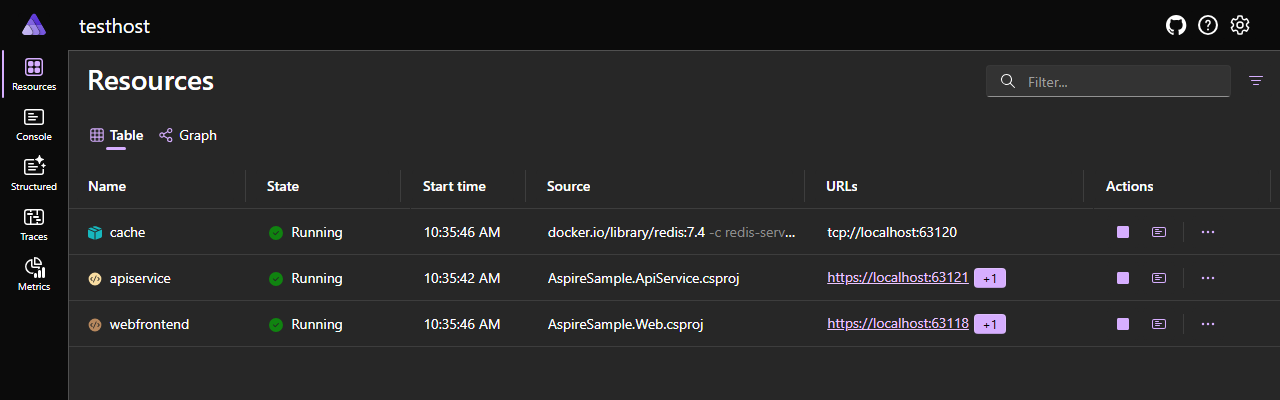 Dashboard overview showing running services and their health.
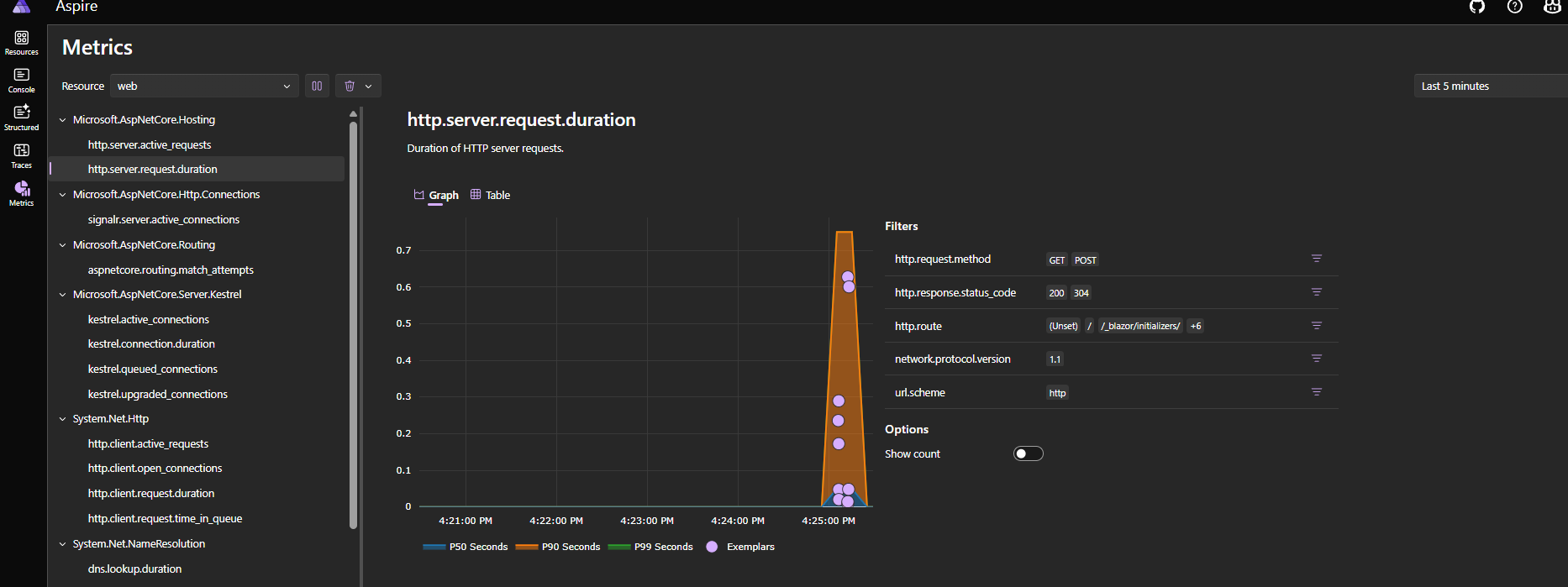 Detailed view of a service's metrics.
Limitations and Pitfalls to Avoid
Limitations / Potential Disadvantages
- Opinionated model: Conventions and abstractions may constrain highly customized hosting or deployment scenarios
- Overhead for simple apps: Single-service or minimal APIs may not benefit enough to justify the additional layering
- Configuration complacency: Default telemetry, resilience, and HTTP client policies may require tuning that is easy to overlook
- Polyglot environments: Adding services written in other languages or external managed cloud resources may require custom integration beyond Aspire's built-in components
Common Pitfalls to Avoid
- Treating AppHost as production IaC: AppHost is primarily for local composition; production infrastructure should still be defined via Terraform, Bicep, ARM, Pulumi, etc
- Embedding business logic in ServiceDefaults: Keep it limited to cross-cutting concerns (observability, health checks, resilience, discovery)
- Hardcoding secrets or connection strings: Use environment variables, user secrets, or secret managers instead of in-source literals
- Assuming local readiness equals production readiness: Startup ordering success locally does not guarantee correct readiness behavior under cloud scaling conditions
- Circular dependencies: Bi-directional service wiring without careful design can produce deadlocks or delayed availability
- Unversioned resource naming: Name collisions or semantic drift can occur if resource identifiers are reused without clear ownership